Showing posts with label digital tutorial. Show all posts

A Trio of Penguins

Happy Thursday everyone!  Today I’m going to share a fun holiday card featuring some adorable digital images!

For my card, I wanted to keep my front panel very simple and feature the cute penguins from the “Holiday with gift and Penguins Collection” and also the penguin with the hat over his face from the “December/January 2016/2017 Digital Stamp Bundle”.  Both of these stamp bundles feature multiple digital images perfect for your Christmas cards.

I’m going to be using some Ranger Distress Oxide inks and my Copic Markers on my card today.
Come and join me in my crafty space for just a few moments to see the entire process of my card. 

Grab a cup of your favorite beverage and join me…

https://www.youtube.com/watch?v=F221osbdtsU&t=1s

Here’s another quick look at the final card.  Isn’t my little row of tuxedo cuties adorable?


Thanks for stopping by!  I’d love to hear what you think below or leave a comment below my video.

Have a great weekend!

~ Ally ~

Puppies and Paper Tole

Howdy all!  Happy Thursday!  I'm over on the Gerda Steiner Designs Blog today sharing a fun tutorial.

I used the adorable “Dog on Scooter Vrooming By” digital image to create my card feature and PLUS I share a tutorial on how to do Paper Tole.

Here’s a little sneak peek…
CLICK HERE to proceed to my post!

Happy creating everyone!

~ Ally ~

Gerda Steiner Designs ~ HaBee Birthday

Happy Thursday!  I hope you’re having a wonderful week!

Today I’m over on the Gerda Steiner Designs sharing another video tutorial using one of the new digital stamp sets, “HaBee Birthday”.

Here’s a little bit of sneak for you…

I’d love it if you came and checked out my tutorial! Click HERE for a direct link.

Have a great day!

~ Ally ~

Fa-la-la-la-la Llamas

Ho ho ho… wait! What?!!?!?

LOL… I’m over on the Gerda Steiner Designs Blog today sharing my fun shaker card featuring their adorable digi stamp bundle, “Fa-la-la-la-la Llamas”.

Here’s a little sneak peek for you of my card…

I hope you’ll hop on over to THIS POST on their blog and check out my full card and tutorial too!

Happy creating today!

~ Ally ~

Make 'em POP!

Howdy all!  Happy Thursday!  Today I'm here to share a very simple tutorial on how to make your little critters (or any other images) POP!

The key ingredient to this technique today is Olba glue. It’s a thick, clear glue with lots of body.  It allows you create a 3-D backer for your fussy cut images to pop up.

Today my card features the adorable “Monkey Hanging in There” and the “Bunny with Glasses” digital stamp sets from Gerda Steiner Designs.


 So come and join me on the Gerda Steiner Designs Blog for the full tutorial... click HERE.
 
Thanks for joining me today!  I hope you too get to try adding some more dimension to your card creations sometime soon.

~ Ally ~


stamps: GSD (Monkey Hanging in There, Bunny with Glasses)
patterned paper: Echo Park Paper Co. (Imagine That! 6x6)
cardstock: Recollections (65# White)
tools: Copic Air Brush System
inks: Copic Markers
3D glue: Olba Glue

Easter Bunny Artist

Happy Thursday everyone!  I'm over on the Gerda Steiner Designs blog today and I'm going to be watercoloring a digital image using some ZIG Clean Color Real Brush markers.
With Easter only a few weeks away, I thought I would build a scene using some of the fun images from the "Easter Bunnies Digital Stamp Bundle".  This is digital bundle is a great investment!  It has 4 bunny images along with all kinds of Easter accessories.

So join me at my crafty desk and find out how I watercolored this adorable digital image...


Here's my card once again...


Isn't that bunny adorable?

Don't forget to check out all the fun digital stamps for sale in the Gerda Steiner Designs shop.

Thanks for stopping by!

~ Ally ~


stamps: Gerda Steiner Designs (Easter Bunnies Digital Stamp Bundle)
cardstock:  Strathmore (Bristol Smooth)
inks: ZIG Clean Color Real Brush Markers

A Furry Tail...

Happy Thursday everyone!  I hope you’ve had a creative week so far!  I’m Allison Cope and today we’re going to delve into the use of multiple digital stamp and then do some learning about how to add texture to your furry critters.

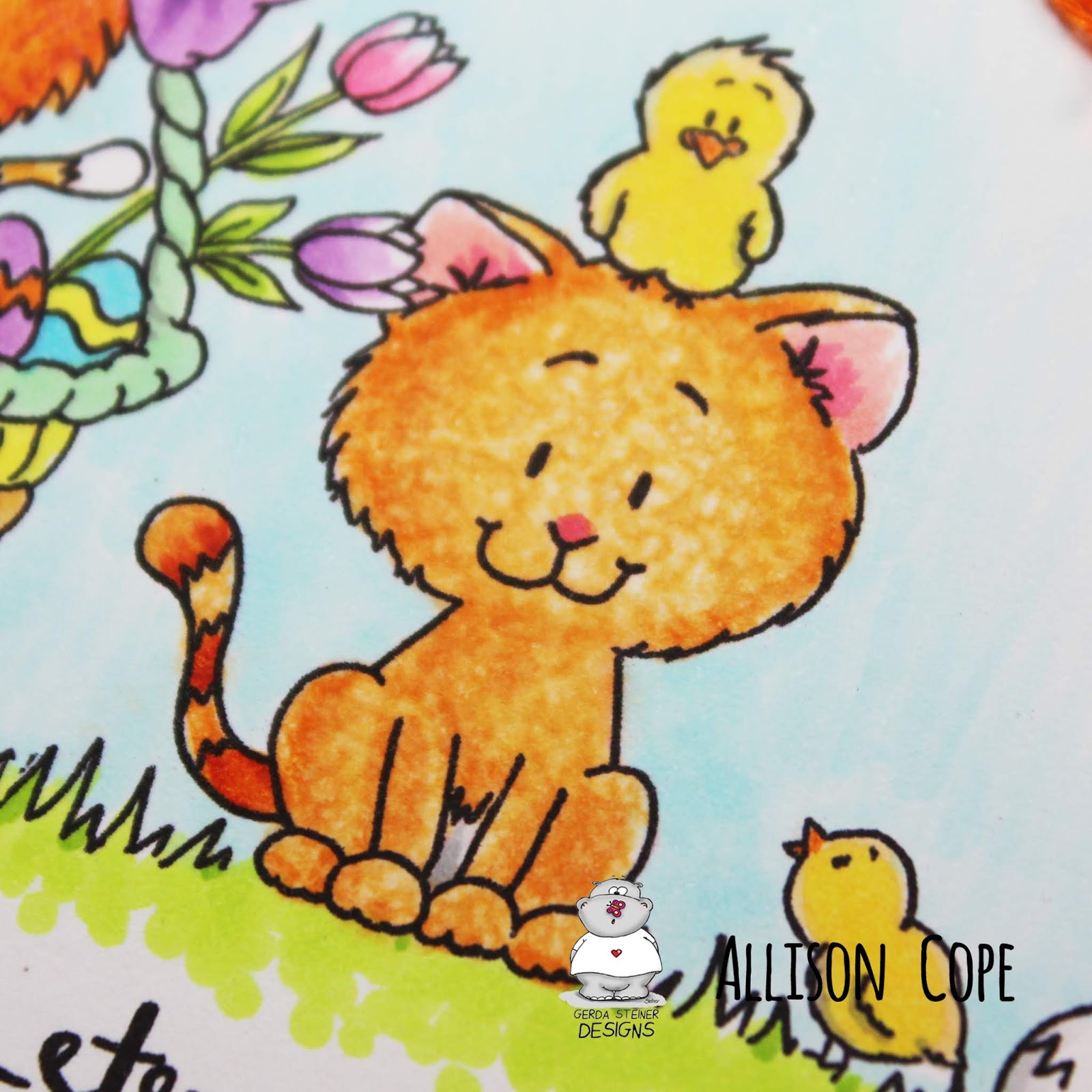
I chose to play with the new “Kitten in Easter Basket” and the “Kitten with Chicks” images, both of which happen to digital images!

Come and join me in my crafty space today!
https://www.youtube.com/watch?v=wfJLWqeypOU&feature=youtu.be

Here again is our Easter card featuring some adorable furry digital images…

Here is a close up of our blender solution kitty…

Here is a close up of our hair texture kitty…

Don’t forget to check out all the fun and new digital stamps in the Gerda Steiner Design Shop! We always have new clear stamps and digital images arriving!

Plus… don’t forget to get your hands our FREE digital stamp too… it’s adorable!
Thanks for dropping by!  Happy creating!

~ Ally ~


stamps: Gerda Steiner Designs (Kitten in Easter Basket, Kitten with Chicks)
patterned paper: Your Next Stamp (Happy Spring 6x6)
cardstock: Recollections (65# & 110# White)
inks: Copic Markers, Copic Blender Solution
dies: Sizzix (Rectangles, Dotted)
other: Embroidery thread.

Paper Piecing with Digital Stamps

Happy Monday everyone!  Today I’m over on the Power Poppy Blog today to share a fun tutorial on paper piecing with digital stamps.  Yup… digital stamps!

I hope you’ll hop on over and check it out! Click HERE to proceed directly to the tutorial.

Here’s a little sneak peek of my card that I’m sharing today…

Thanks for stopping by!

~ Ally ~

Autumn and Santa Too?

Here in Alberta we’ve had snow on and off for the last 4 days.  It really hasn’t stuck around but continues to fall.  I’m SOOO not ready for winter to begin.  We had such a wet summer that it didn’t really feel like a summer at all!  I need just another 6-8 weeks of Fall!!!

I’m over on the Power Poppy Blog today sharing a quick tutorial on how to use Copic Markers and the air brush system to create simple back grounds.  Click the photo below to be taken to the post!
http://powerpoppy.blogspot.ca/2016/10/inspire-me-monday-simple-copic-air.html

So in honour of another snowy day, I thought I’d pull out my new holiday themed Kraftin’ Kimmie Stamps and create a card for their Wonderful WednesdayAnything Goes” challenge. 

For this card, I used their brand new “Dear Santa” stamp set.  The inside reads “Define ‘good’?”  LOL… so cute right!
 Copics:  coat/hat: R14, R17, R29, R89  dog: E30, E23, E25, E27  skin: E50, E00, E11, R02  
hair/coat: N1, N2  boots: N5, N7, N10, Y13, Y17

I used the fun and fab “Log Cabin Mounainscape” die from SugarPea Designs for my background.

I hope you’re having a great Monday.  It’s the last day of our Thanksgiving weekend so we’re just playin’ it easy today.

~ Ally ~

supplies:
stamps: Kraftin’ Kimmie Stamps (Dear Santa)
dies: SugarPea Designs (Log Cabin Mounainscape)
inks: Memento (Tuxedo Black), Copic Markers, Ranger Distress (Tumbled Glass, Salty Ocean, Blueprint Sketch), SSS (Lake Shores), Sakura (White Gel Pen)
cardstock: Recollections (White 110#)

Geraniums and Gingham

There is NOTHING I love more than using a gingham patterned paper… it just thoroughly makes me smile from ear to ear.  So when I was finished creating my beautiful Geraniums panel for my card last night, I just couldn’t resist using this gorgeous green gingham from some Graphic45 Christmas papers to complete the look I wanted.  The “Geraniums” are a newly released digital stamp set from Power Poppy with the same name.


My card today was designed using the latest Card Sketch from Splitcoaststampers.   It’s my week to share a sketch and this was it… SC497;

Now, if you have never worked with digital stamps... no worries!  I have actually created a step-by-step tutorial over at StampNation just for those people just beginning to dabble in this art.  I show you exactly how I created this very card front.  I hope you’ll check it out…

http://www.cartville.com/app/?af=1586497


~ Ally ~

Sponsored byPower Poppy


Supplies:
stamps: Power Poppy (Geraniums)
cardstock:  Recollections, Bazzill
patterned paper:  Graphic45 (The 12 Days of Christmas)
white pen:  Sakura

pearls:  Doodlebug Designs
tools:  sewing machine, Photoshop CS3, Copic Airbrush
inks: Copic Markers, Ranger Distress Inks
die cut shape:  Spellbinders.

Blue, Gold and Vellum

Check out the latest sketch from Splitcoaststampers Card Sketch Challenge this week, SC494!  It’s a very versatile sketch by Janette that you’ll love!

And check out my card creation for her sketch…

 I had so much fun creating the digital paper for my 3 panels.  I used the brand new digital stamp, “Countryside Bouquet” from Power Poppy.

I pulled the amazing bouquet of cosmos, lipstick plant and poppies into Photoshop, added some light orange colour to only the poppies (sorry it’s so hard to see that aspect!) and the changed the opacity over top a teal blue back ground.  I cut the single panel into 3 equal parts, stitching them and add some gold gilding to each panel’s edges. 

Here’s a quick close up of of the gold detailing and my gold embossed sentiment from the “Azalea” stamp set, also from Power Poppy.

Thanks for stopping by.  I hope you’ll join us Splitcoast for this week’s awesome sketch!  Happy stamping!

~ Ally ~

Sponsored byPower Poppy

Supplies:
stamps: Power Poppy (Countryside Bouquet, Azalea)
cardstock:  Recollections, vellum
ink: Versamark
gold pen:  Sakura

tools:  Photoshop CS3
gold embossing powder:  PKGlitz
other:  thread.

Tutorial: Adding Texture With Copics!


Join me on the Power Poppy Blog today for a quick and super EASY way to add some cool texture to your Copic coloured creations!

Click here!

~ Ally ~

Sponsored by:  Power Poppy

Tips for Digital Stamps

Power Poppy has ventured into the land of digital crafting this month with their new release of some amazing digital flower stamp sets and sentiments; Gerber Daisies, Gladioli, Tulips and Peonies.  Come along with me and find out how you can create using these beauties using a FREE photo editing software called GIMP.

Join me on the Power Poppy Blog today to find out how I created the focal panel for this card...


See you there!

~ Ally ~

Sponsored byPower Poppy

Be Power Poppy PINspired!

PowerPoppyPinterestGFX-1
Hi everyone! Ally here, sharing a bit of fun that will be taking over the Power Poppy blog over the next few weeks! Tune in each Friday and you’ll not only get a chance to get in on some fun challenges using our new “Instant Garden” Release, but you’ll have a chance to win some Power Poppy goodies!

First up, have you checked out the Power Poppy boards over on Pinterest? If you haven’t — man are you missing out! There, you’ll find all of the creations from the Bloom Brigade and they are categorized by set — meaning all you need to do is click on over for instant inspiration in your own stamp room.

Here’s just a taste of what we’ve got going on! Look at all that eye candy!

PP PIN

So, how can you win? If you aren’t yet a follower of our Pinterest Boards, why not right? If you become one, we’ll draw one lucky follower to WIN the Power Poppy release for June – that’s a $72 value — just for signing up and being inspired in the process! Again, just log into your Pinterest account, click HERE and then click on the red button and you’ll be in the running! The winner will be announced on June 2nd after we unveil our fun-filled June release!  

Here's another fun card creation using our newest stamp release set, "Peonies".

I used my Photoshop program and designed my own patterned paper by created a linen textured back ground and then added my multiple peony digital stamps resized to fit my paper scale.


Here's a close up of my patterned paper detail.  You can see the texture of the faux linen behind the semi-transparent peonies...
Thanks for stopping by today.  Make sure you check out the entire new "limited time only" digital release from Power Poppy!

Good luck and we’ll see you at the Power Poppy Hot Spot (a.k.a. the blog) soon! 

~ Ally ~

Sponsored byPower Poppy

Supplies:
stamps: Power Poppy (Peonies)
cardstock:  Recollections, Flourishes Classic Black, Bazzill
die cut shapes: Spellbinders
ink: Ranger Distress

twine:  Darice tools: Photoshop CS3
other:  thread.
 
09 10